Twitter on Windows Phone vs Twitter on Android

They say A picture is worth a thousand words, here is a comparison of the twitter app on Windows Phone and on Android. If they were both application on a desktop Windows computer for example!

Twitter on Windows Phone vs Android (Click to enlarge) 

Posted in , , |

Panoramic View of Paris [Xperia Arc S]

I've received the Xperia™ arc S yesterday which I love very much. One of the features I like about this phone is the fact that one can take panoramic photos on the fly, and the great HD video shots along with the great screen.

Here are some shots I took today around Paris, use the mouse to navigate left/right; enjoy.
(You can view the pics in better dimensions here.)


Posted in |

Workaround to Access Windows 8 Start Menu Programs Again

Update:
Much of the search queries to this blog are about this post, or how to access the old start menu on windows 8.

There are great applications that mimic the old start menu. One of the preferred features is that once a user logs in, she is taken directly to the standard desktop. Personally I have been using Stardock's Start 8 (the same guys who developed the awesome Fences application) which I find excellent, it is not free however (costs over $5). Following are screenshots of Start 8 on my Windows 8 laptop.

Start 8

Start 8
Another option is to use the free "Classic Shell" which can be found here http://classicshell.sourceforge.net/. Following is a screenshot of  Classic Shell's start menu:


Old post

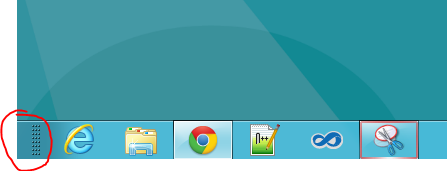
If you have already tried the Windows 8 consumer preview, you have surely noticed that there is no start button anymore, which means no easy way to access your programs using the start menu as we used to do since forever.
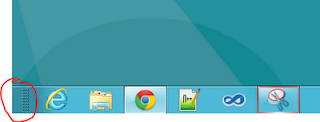
Start Button missing in Windows 8
This is impractical since it means: whether you have to put some shortcuts on the desktop, or go to the metro start screen each time hoping to find the application icon there.

However, you can do a simple trick to access the whole start menu again.

To do this, right click the Super Bar and choose Toolbars -> New toolbar. In the dialog, choose the folder C:\ProgramData\Microsoft\Windows\Start Menu\Programs and click "Select folder".


Once added, you can click the arrows to access the programs and folders of the start menu, you can also drag it to the left so that it takes the start button's original place.

Start Menu items without a start button on Windows 8
You can also still access some parameters without having to go through the Control Panel shortcuts etc. by hovering over the left bottom corner of the screen and right clicking to get the following menu :


Posted in |

Factoring Large Numbers With Distributed Quadratic Sieve

Integer factorization is a problem that has its roots in the very far history, it is a fascinating problem (to me especially) that has gained a lot of attention in the recent years for cracking the RSA cryptosystem for example.

While having no time to blog about the internals of one of the very efficient methods to factorize relatively large numbers, I present here a simple implementation I have developed of the Quadratic Sieve to factorize relatively big RSA numbers. For a reference about the mathematical premises, the 6th chapter entitled Subexponential Factoring Algorithms of the Prime Numbers, A Computational Perspective book is pretty great.

The program available here is composed of 4 different versions, 3 centralized (sequential) and 1 distributed using MPI. The distributed version needs to be run on at least 2 nodes. The centralized versions consist of different implementation experiments : 
  • The first one keeps the exponent vector of each smooth number (impractical due to the huge memory needed to keep the vectors).
  • The second one sieves at an interval centralized at sqrt(N); according to my testing, this has no visible improvements over the standard one. 
  • The last version which is the same as the first one but which uses only a binary exponent vector (saving one bit for each prime in the base) for the smooth numbers.

One of the caveats of this implementation is the linear algebra step that performs the Gaussian elimination. The method I am using is the most naive one (though goes pretty fast using XOR operations on GMP integers) which keeps an identity matrix besides the effective matrix while performing the Gaussian elimination, and hence the program needs twice the memory needed for the matrix.

The distributed version spawns as many nodes as needed and makes them all perform the sieving step, after some very hundreds of thousands of steps, the slaves communicate their found smooth numbers to the master which decides if they must stop or should continue sieving for more numbers. Sending GMP integers mpz_t over MPI was very challenging due to the way MPI handles the string representation of these numbers (sometimes '\0' are included at the end and the length returned does not represent exactly the number of characters in the string).  You can take a look at the functions doing the MPI send/receive of mpz_t here.

You will need the mpfr library too (for logarithm calculations) in case you want to test the programs, for the distributed version, compile with mpicc and run with mpirun as usual.

Results:
Centralized version:
Distributed version (60 intel i7 nodes):

Posted in , , |

Factoring Integers: Part 1 - Pollard's rho Method

I'll be developing a program for factoring numbers (especially RSA numbers), the goal is to have a parallel quadratic sieve program running on GPUs (using CUDA or OpenCL) to factorize RSA numbers.

I have just started playing around GMP so I implemented a naive version (in C) of the Pollard's rho factoring method, it uses the optimisation technique proposed by Pollard and Brent, however it doesn't check for cases that may cause the algorithm to fail.

In order to compile this program, you need to have GMP installed.
You can invoke the program with ./pollard-rho NUMBER or ./pollard-rho p q where the number to factorize is p*q.

Compile : gcc pollard-rho.c -o pollard-rho -lgmp -lm


Rolling Back a Project to Windows Phone OS 7.0 After an Upgrade to 7.1 (Mango)

If you had a project that was developed before the Mango SDK was available, or a project that was created with the Windows Phone 7.0 as the target platform and wanted to upgrade to 7.1, then there is no way to roll back to 7.0 again, which means that your app will be available only for those who have Mango updated devices.

On creating a new Windows Phone project with the Mango 7.1 SDK tools installed, Visual Studio prompts you for the target platform:
If for any reason, you want to upgrade the app to take advantage of the 7.1 SDK (use background agents, live tiles' animations etc..), you go to Project -> Project properties and set the target to OS7.1:
Once the Windows Phone OS7.1 version is selected, Visual Studio shows the following warning stating that once upgraded, the application cannot roll back to Windows Phone OS 7.0 anymore :

Because the referenced projects are not upgraded with the app, there is actually a way to roll back anyways, even if Visual Studio warns it is not possible.

First in the WPAppManifest.xml you need to change the AppPlatformVersion back to "7.0". Then unload the project from Visual Studio and open your *.csproj with a text editor. Locate <TargetFrameworkProfile>WindowsPhone71</TargetFrameworkProfile> and change it to <TargetFrameworkProfile>WindowsPhone</TargetFrameworkProfile>.

Reload the project in Visual Studio, and voila, it's back to version 7.0.

Hope this helps.


Posted in , |

Swedish Greys - a WordPress theme from Nordic Themepark. Converted by LiteThemes.com.