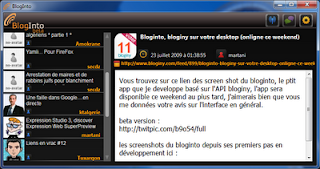
BlogInto is a desktop client that let you use bloginy from your desktop (like TweetDeck for twitter), it uses the bloginy API and some standalone functionalities to retrieve and show feeds and their associating information like user avatars and so on.
The current release is so basic, it's a beta version and it supports all the features available in the API so far. It’s built mainly on the .NET Framework using WPF and Linq.
If you have the .NET Framework 3.5 SP1 you can download the non-installable version (140 Ko) or you can download the installable one (1 Mo) and benefits from automatic updates and shortcuts on the Start menu and the desktop.
Here are some screenshots of the application:

public feeds :
user specific feeds :

A 2 minutes video showing BlogInto and it's features :
- Features of this version:
BlogInto 1.0 beta support the whole API provided by bloginy for the moment (which is still so limited) and here are the features it supports :
- Loading public feeds
- Loading user specific feeds
- Showing feeds details
- Showing a HTML representation of the feeds body
- Retrieving Avatars associated to users (not in the API)
- Portable code: execute without installing.
Installable version (1 Mo):
Non-Installable version (140 Ko):
We tested BlogInto on Windows 7 (main host), Winows Vista and Windows XP, but it would work normally under Windows 2003 and 2008 too.
The only component BlogInto need to run is the .NET Framework 3.5 sp1, if you run the installer of BlogInto it'll install the .NET framework 3.5 first if it's missing, but I suggest that you install it yourself then install BlogInto.
Because we are running a beta testing, the application is designed to show errors as it encounters them and might also crashes without handling them (at least it didn't yet for me), means that it will show the whole exception message once it encounter an error, if you want help us improve the application, please send us that message along with a small description on how, and in which circumstances the error occurred, you can contact us from here :
http://www.martani.net/2008/03/welcome-to-martani-fakhrou-blog.htmlYou may also leave a comment here indicating problems you might encounter.
- FAQ: (you can skip what is between (...) )
1. The name:Q : What a stupid name! XD
A : Well maybe, "bing" too is more stupid, but BlogInto stands for "
Bloginy
Into Bloginto" if that makes sense :)
2.Q Is running BlogInto without installing it means it's portable :A. Kinda yes, Portable in the context of the .NET Framework, whenever you can run it, BlogInto also needs no installing (don't be happy Mono on Linux users :) it doesn't work there)
3.Q : What about Linux and Mac ("we" hate Microsoft):A : For now BlogInto run only on the Windows operating system (don't be sad), but, the good news is that we work on the next version, maybe with the apparition of the API 2, and we will make it running on Silverlight instead of WPF, so Mac users, you are on our next list, Silverlight 3 is totally supported on Mac and Windows.
4. Security:Q: What if you include a spyware or a Trojan with that "BlogONTO"
A: Update your antivirus.
(Q: what if you just steal information from my computer without any suspicious threats that make the AV awake
A: run it on a virtual PC, analyze traffic and tell me
Q: Ok, ok, but how I trust you?
A: dude! Shut up.)
5.Q: Why you are providing shorned URL's for the downloads?
A: I'm trying to keep an eye and do some statistics on how much the application was dowloaded, which period of time and so on.
6.Q: Cool!
A: Yeah :D
7. The source code:
Q. Is it open source, or at least can we see the code?
A: It's not open source, for now we will wait for the application to be complete (hence the API to be complete), so when we support automatic updates, sending new feeds, replies, comments, updating profiles and some other stuff, maybe we will consider making it available. For now you can see a little piece of code with Linq used in the application :
public Feed getFeed(int id)
{
        var f = from n in feeds
                where n.Id == id
                select n;

        if (f != null)
                return f.First();
        else
                return null;
}
I hope you enjoy it.


