Showing posts with label windows phone 7. Show all posts

Twitter on Windows Phone vs Twitter on Android

They say A picture is worth a thousand words, here is a comparison of the twitter app on Windows Phone and on Android. If they were both application on a desktop Windows computer for example!

Twitter on Windows Phone vs Android (Click to enlarge) 

Posted in , , |

Rolling Back a Project to Windows Phone OS 7.0 After an Upgrade to 7.1 (Mango)

If you had a project that was developed before the Mango SDK was available, or a project that was created with the Windows Phone 7.0 as the target platform and wanted to upgrade to 7.1, then there is no way to roll back to 7.0 again, which means that your app will be available only for those who have Mango updated devices.

On creating a new Windows Phone project with the Mango 7.1 SDK tools installed, Visual Studio prompts you for the target platform:
If for any reason, you want to upgrade the app to take advantage of the 7.1 SDK (use background agents, live tiles' animations etc..), you go to Project -> Project properties and set the target to OS7.1:
Once the Windows Phone OS7.1 version is selected, Visual Studio shows the following warning stating that once upgraded, the application cannot roll back to Windows Phone OS 7.0 anymore :

Because the referenced projects are not upgraded with the app, there is actually a way to roll back anyways, even if Visual Studio warns it is not possible.

First in the WPAppManifest.xml you need to change the AppPlatformVersion back to "7.0". Then unload the project from Visual Studio and open your *.csproj with a text editor. Locate <TargetFrameworkProfile>WindowsPhone71</TargetFrameworkProfile> and change it to <TargetFrameworkProfile>WindowsPhone</TargetFrameworkProfile>.

Reload the project in Visual Studio, and voila, it's back to version 7.0.

Hope this helps.


Posted in , |

NYTimes Newsreader and LeParisien Journal for #WP7

I've developped lately two new Windows Phone apps which are newsreaders based on RSS for the New York Times newspaper and LeParisien.fr Journal.

The two apps come in two versions,a free version which is ad-powered and a paid version which is ad-free. Following is a brief description and download links for the two apps.

NY Times Newsreader :

Read the NY Times newspaper directly on your Windows Phone device.

The NYTimes Newsreader gives you access to all the major sections of the NY Times newspaper organized in categories for easy and fast navigation with full articles view using the NYTimes' RSS feature.

Features:
- Browse news by categories (7 categories and more than 40 sections)
- Front page news
- Articles thumbnails
- Share articles by email and SMS
- Favorite your articles to read them later
- Read full articles directly from NYTimes Newsreader

Categories:
- World
- Op-Extra (Opinion, Columnists, Editorials, Magazine ...)
- Technology
- Science
- Sports
- Arts
- Business


Download (FREE version)


LeParisien :
Suivez toute l'actualité française et internationale avec LeParisien.fr Journal sur votre Windows Phone

Accédez à l’intégralité des articles de leParisien.fr classés par rubrique (5 rubriques et plus de 30 catégories)

> Sauvegardez vos articles favoris pour une consultation ultérieure
> Partagez l’information avec vos amis via Email ou SMS

Accédez en un clic aux dernières news :
- L'info du Parisien
* Politique
* International
* Faits divers
* Economie
* Société
* Loisirs et spectacles
* Médias et people
* Automobile


Download (FREE version)


Posted in , |

Beta SMS for Windows Phone 7 is here

I’ve developed Beta SMS for Windows Phone 7 back in January, but due to delays and problems with the GeoTrust registration process to publish apps on the Marketplace, the app has been published only yesterday on the WP7 Marketplace, available for $1.29.

Beta SMS allows you to send cheap or free SMS from your favorite BetaMax and VoIP provider directly from your windows Phone 7 device. It supports more than a dozen of SMS services like 'WebCallDirect' and 'Voip Discount' and still counting.

In order to use Beta SMS, you need to have an account in one of these services:

SUPPORTED SERVICES:
- webcalldirect.com
- voipdiscount.com
- poivy.com
- voipstunt.com
- voipwise.com
- voipcheap.com
- internetcalls.com
- smslisto.com
- justvoip.com
- voipbuster.com
- freecall.com
- intervoip.com
- smsdiscount.com
- dialnow.com
- telbo.com

In case your favorite provider is not listed here, please contact me (the contact information are available on the Marketplace with the app description) and I’ll make sure to include them in the coming updates.

        s1s2s3
 
You can download Beta SMS from here :

Downlaod Beta SMS

More info on WP7applist.com.

Posted in , , |

#WP7 Hacks, Reading / Writing the registry on Samsung Devices

The folks over xda are doing a great job with all the new Windows Phone 7 hacks, but it seems that the HTC devices are the ones getting all the fun there.

For instance, the member xboxmod have found a way to install provxml on WP7, and hence total access to the registry, which allowed them to change the WP7 themes with custom colors, disable relocking the phone once unlocked with ChevronWP7 and a lot of other stuff.

On the other hand, a lot of the member have been asking if there is a way to do so on Samsung devices (Omnia 7 and the Focus). While we have access for read/write on the registry for Samsung devices, it is so limited compares to the provxml method on HTC devices.

I developed a simple app showing how to write the registry using the Samsung native DLLs, so hopefully some guys will pick this up till we come up with a full functioning method to manage the registry on Samsung Devices.

This is the link to the application (the XAP file with the source code), you find in the same thread a homebrew registry viewer too which allows the traversal of registry keys.

Sans titre

Happy hacking!

Posted in |

Reading IMEI on Windows Phone 7 Devices (Samsung Only)

This is a short post showing how to read IMEI (and other stuff if you want to walk alone over the code) on Samsung devices running Windows Phone 7.

This simple code uses the Samsung native DLLs for Windows Phone 7, so they (surely?) won’t work on LG or HTC devices.

Requirements:

If you are new to WP7 hacking, you may need some research on how to get started executing native code calls on Windows Phone 7, here are the requirements in a quick recap:

  • <Capability Name="ID_CAP_INTEROPSERVICES" /> inside the <Capabilities> tag in the WMAppManifest.xml file.
  • a WPInteropManifest.xml file in the root of your solution containing:
       1: <?xml version="1.0" encoding="UTF-8"?>
       2: <Interop>
       3: </Interop>

  • The Samsung native DLLs, a hint for where to find them? Hack the Marketplace, or just download them from here :D
  • A reference to Microsoft.Phone.InteropServices.dll, you can grab it from here and then add it to the Windows Phone 7 SDK.
  • In case you forgot to strong name the DLL above, here’s the last step you need (the Visual Studio command prompt must be started with admin rights)

       1: SN -Vr "PATH-TO-DLL\Microsoft.Phone.InteropServices.dll"

Code :

After setting up everything, you can read the IMEI as following:

   1: public partial class MainPage : PhoneApplicationPage
   2: {
   3:     // Constructor
   4:     public MainPage()
   5:     {
   6:         InitializeComponent();
   7:         this.Loaded += new RoutedEventHandler(MainPage_Loaded);
   8:     }
   9:  
  10:     void MainPage_Loaded(object sender, RoutedEventArgs e)
  11:     {
  12:         
  13:         ComBridge.RegisterComDll("COMRilClient.dll", new Guid("A18F6B1A-924E-4787-AA82-19F98B49CF5D"));
  14:         COSecRilControl cls = new COSecRilControl();
  15:         ISecRilControl intrfc = (ISecRilControl)cls;
  16:  
  17:  
  18:         //READING THE IMEI
  19:         string imei;
  20:         intrfc.GetIMEI(out imei);
  21:     }
  22: }
  23:  
  24: [ComImport, Guid("A18F6B1A-924E-4787-AA82-19F98B49CF5D"), ClassInterface(ClassInterfaceType.None)]
  25: public class COSecRilControl
  26: {
  27: }
  28:  
  29: [ComImport, InterfaceType(ComInterfaceType.InterfaceIsIUnknown), Guid("A5857C17-04C2-49c5-A460-05A21660588F")]
  30: public interface ISecRilControl
  31: {
  32:     void Init();
  33:     void Deinit();
  34:     void Run(int mode);
  35:     void End();
  36:     void SetInput(int type);
  37:     void Back();
  38:     void GetDispInfo(out uint svcMode, [MarshalAs(UnmanagedType.SafeArray)] out byte[] info);
  39:     void GetEvent(int type, out int pEvent);
  40:     void SetEventCOM(string name);
  41:     void LaunchExe(string exe, string arg);
  42:     void DoHiddenKey(int hashcode);
  43:     void GetLockingStatus(out uint m_dwLockFacility, [MarshalAs(UnmanagedType.SafeArray)] out byte[] pPasswd);
  44:     void SetLockingStatus(out uint m_dwLockFacility, string data, out uint m_dwStatus, [MarshalAs(UnmanagedType.SafeArray)] out byte[] result);
  45:     void GetIMSI(out string IMSI);
  46:     void GetIMEI(out string IMEI);
  47:     void DoHiddenKeyWithResult(int hashcode, out string jobName);
  48:     void WaitNamedEvent(int timeout, string name);
  49:     void RegSetDWORD(uint HKEY, string pwszPath, string valueName, uint value);
  50:     void RegGetDWORD(uint HKEY, string pwszPath, string valueName, out uint value);
  51:     void RegSetString(uint HKEY, string pwszPath, string valueName, string value);
  52:     void RegGetString(uint HKEY, string pwszPath, string valueName, out string value);
  53:     void ReadTextFile(string path, out string result);
  54: }

This is a great read about Windows Phone 7 hacking [link].

Posted in , , |

Windows Phone 7 hacks, all the diagnosis codes you need, Part 2

As promised in part 1, here is the rest of the Samsung diagnosis codes for Windows Phone 7. If you don’t know how to use them, refer to part 1 for more information.

*#05# Main tests : Camera, sensors, proximity, battery, acceleration, light …
*#9908# GPRS manager/Gumi test Bed/ Suwon2G / Suwon3G
*#9909# -
*#9911# Debug mode for chg/bat
*#9920# -
*#32489# Ciphering control
*#32589# Camera FW update
*#94765# Disable AutoSim settings
*#99732# The (Java) Build script
*#99785# PVK Key
*#232331# Bluetooth RF Test Mode
*#232332# Bluetooth Audio
*#232333# Bluetooth Search Test
*#232337# Bluetooth Mac
*#232338# WLAN Mac
*#232339# WLAN Test – Change channel – Datarange etc..
*#737425# -
*#914789# Apps launcher / List of EXE files
*#997856# PVK File name
*#1472365# Black Swan GPS location services
*#4238378# GCF / GSM
*#7465625# Lock status/ network lock / Subset, SP lock/ CPLOCK
20652609 Disable Bluetooth log
20652619 Enable Bluetooth log (you can copy the file ftslog.cfa use wpget.exe)
20652629 SSP debug on
20652639 SSP debug off
*#22558463# Call time logs
35190718 Erasing IMEI (seriously?)
35190728 Bluetooth stuff
61709124 =
61709134 Bluetooth log
61709144 SSP
61709154 SSP
71671835 Factory Reset (careful while testing this one)
76247233 Factory Reset
76247243 Factory Reset
*#99867247# -

Posted in , |

Windows Phone 7 hacks, all the diagnosis codes you need, Part 1

Lately I have been working on some hacks for the Windows Phone 7, and was interested especially in the Samsung diagnosis app that uses different codes to debug their devices.
I’ve succeeded to extract more than 60 codes that I will show in this post and the next one, and their basic functionality/use in the diagnosis app.
The following codes were tested on a real Samsung Omnia 7, I’ll be happy if you can confirm their use on other devices as well.
To enter the diagnosis app, type ##634# and press call, the application should now be placed on the list of apps.

*#80# Touch Debug stuff
*#526# Wifi factory test
*#745# -
*#780# SR test
*#1111# FTA SW version
*#1234# WIFI / Bluetooth mac
*#1575# Gps test mode
*#1793# Micro usb / sync / modem / tethering
*#2222# FTA HW version
*#2263# WCDMA, GSM band
*#2470# Camera FWUpdate
*#2580# Integrity control
*#2663# Touch Screen Version
*#7284# Micro USB Test
*#7298# GPRS settings, auto pwr on/off
*#7353# Self Diagnosis tool
*#7450# Error report Off
*#7451# Error report on
*#9090# USB Diag / DBG msg on/off
*#9900# Debug Dump
*#9906# Debug Dump + Ril log
*#770# Vphone tests 0
*#771# =
*#772# =
*#773# =
*#774# =
*#775# =
*#776# =
*#777# =
*#778# =
*#779# Vphone tests 9
Images-0035Images-0041

Posted in |

Windows Phone 7: why you should obfuscate your code

A while back Microsoft sent some warning emails to the registered Windows Phone 7 developers about the threats their apps might face once published on the Marketplace. The apps on the Marketplace are available for download without any authentication required. What you need to get an app is simply the direct link to the .xap file, something of the form http://apps.marketplace.windowsphone.com/app-guid-here/CurrentBinary.xap, which contains the DLL that can be disassembled very easily with Reflector for example. More info here.

Here’s an excerpt from the email :

It is important to note that because of the leak containment steps Microsoft takes applications obtained outside of Marketplace will not run on consumer retail devices. Modified files would only run on a limited number of “unlocked” phones, such as those that have been registered by Marketplace developers on App Hub….

One powerful tool for protecting your apps and games is code obfuscation, which is a long standing best practice for managed code. Obfuscation is available tools like the Dotfuscator product recently announced for Windows Phone 7 applications. Microsoft has partnered with PreEmptive Solutions to make this tool, as well as a robust application analytics solution, available to Windows Phone developers for free through March 31st, 2011.

Right now, it seems that the only option to protect your app, is to use a code obfuscator, since anyone is allowed to download it from Microsoft servers without any restriction, whether they are using a real Windows Phone 7 or they are sniffing the traffic made by the Zune software (yes, I’m not going to tell you how to do it! you need to figure it out yourself).

For demonstration purposes, here is what Reflector shows when applied on an obfuscated DLL and on a non obfuscated one:

obfuscatedobfuscated1

1. Obfuscated

clear

2. Clear

As you can see, on the obfuscated version, Reflector shows either a message saying that the code was obfuscated and it cannot be disassembled, or a bunch of unreadable variable names with a lot of “goto” instructions.

On the other hand, the non obfuscated version is disassembled to (almost) the original source code, only the comments are missing.

Last word, if you are developing anything for Windows Phone 7, do not forget to obfuscate your code before publishing your app on the market.

Posted in , , |

Windows Phone 7 Hacks : the start…

So Windows Phone 7 haven’t been out for a long time and we have already started to see some hacks from around the web. In this post series, I’ll list the hacks and tips that I test myself on my Samsung Omnia 7. As a result I won’t be held responsible for you screwing anything up with your machine.

Diagnosis mode:

Diagnosis mode on Windows Phone 7 seems to be a way WP7 creators used to test the devices, fortunately, it is also used to enable and disable features on the phone, here is how to activate it:

  • type ##634# and press call, the diagnosis app should now be added to your applications
  • there are a lot of diagnosis codes that you can try, for instance :
    • *#03# will get you to the SMDInfo
    • *#05# will give you a very rich interface for testing capabilities, including Vibration, keys, Camera, TSP, Acceleration, Battery, Proximity, Loopback and Light
    • *#1234# will show a lot of information including the Wifi Mac address and the Bluetooth Mac address
    • *#06# shows the IMEI number
    • *#2222# some debugging stuff that I couldn’t figure out.


Enable tethering mode :

By going to the Diagnosis mode showed in the previous section, and typing *#7284# you will get the choice to change the connection to the PC from Zune sync, to Modem Tethered Call or Modem Usb Diag, more coverage about tethering here.

You need to note that using the device as a modem will enable you to connect your PC to internet using the phone’s network, I couldn’t reach this in France, since the dial-p numbers for SFR don’t seem to work for me (*#9# or *#9***1#).

Also, on Windows 7 x64, the phone won’t be detected, I suspect that the drivers are not signed and Windows reject them, hence you need to try the above method on a 32bit Windows.

Here is a screenshot for Samsung Omnia 7 installed as a modem on a Vista x86.

wp7-2wp7-3


SD-Cards, are they seriously dead once put on a WP7 phone?

There have been a lot of talking about this one, and how magically Windows Phone 7 locks sd-cards so they become unreadable and cannot be formatted on any other machine.

It turns out that Symbian devices can actually format WP7 sd-cards, so if you got a nokia, you are clear, all your sd-cards are useful again, more on the topic here.


WP7 already rooted, jailbreaked?

It seems it will happen soon, some developers out there are claiming access to the wp7 filesystem, let’s hope it will happen soon, more here.

Windows Phone 7 filesystem access


Source code of apps on the Marketplace:

A very strange but true fact about wp7 and the Zune software, is that, when you use Zune to download apps from the Marketplace, you can sniff the traffic sent and returned to Zune to intercept the url of the application xap (a zip file containing binaries and resources of the app).

Once, this xap is downloaded (yeah, MS servers just give you the app happily without any authentication or anything), the DLLs could be disassembled to retrieve the original source code, using a tool such as .NET Reflector for example.

This is a sample of a url of an app from the Marketplace http://apps.marketplace.windowsphone.com/****id-here****/CurrentBinary.xap

More details will be discussed about this specific topic, from how to sniff packets till full disassembly (it is legal isn’t it?)


Mount a wp7 device as a USB drive:

Today, a small hack showed that wp7 can be mounted as a normal usb drive, but unfortunately, you can only copy files *from* wp7, I tried to copy files to wp7 including music and pictures, but it didn’t work, you can’t also create new directories neither.

Well, now it seems I am able to copy files into the phone :D. No, no, it is back, I cannot copy files into the phone, need more investigation it seems.

For how to make wp7 behaves as a USB drive, here is how

  • Open regedit, and locate HKEY_LOCAL_MACHINE\SYSTEM\CurrentControlSet\Enum\USB then search for ZuneDriver
  • Change ShowInShell from 0 to 1
  • Change PortableDeviceNameSpaceExcludeFromShell from 1 to 0
  • Change EnableLegacySupport from 0 to 1

Voila! just close that cursed Zune thing and the phone will show up as a USB driver as showed in the following pictures.

If you need assistance with pictures (!!) here’s a detailed post about it.

wp7wp7-1

Posted in , |

Windows Phone 7 : hands on (Samsung Omnia 7)

It has been almost a week I am trying a new device, the Samsung Omnia 7, which runs the new Microsoft’s OS Windows Phone 7. It took me a lot of time to get one after the very chaotic launch of the new OS in France, but well, finally I’ve got one.
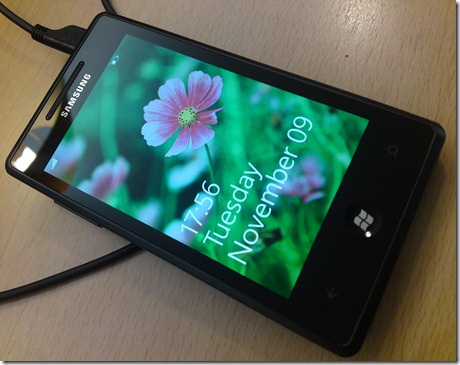
DSC00487

In this post, and the ones that will follow, I’ll describe my experience with the new OS (the device too), so if you are looking for a technical review of the OS, here’s an exhaustive review from ars technica.

The OS

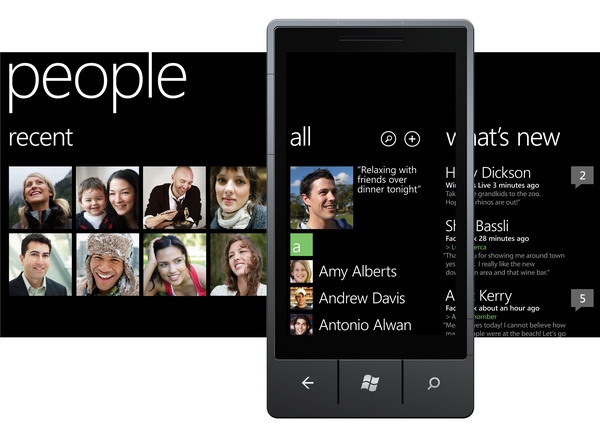
Talking about the OS itself, there are things I love about it, things I like, and stuff I hated already. The look ‘n’ feel of the Windows Phone 7 UI is great, I like so much the minimalistic design, no round boxes, no shadows etc, just different sizes of text to differentiate the title of a page from its content for example.
DSC00520          DSC00522

What I also like about Windows Phone 7 is the fact that you can use several services other than Windows Live for syncing contacts, calendars and emails. Gmail integrate pretty well, and if you have been an Android user like me, all your contacts can be imported just as easy as your Live ID contacts.

The camera is awesome, when taking a picture, you just slide on the left side and you get the last pic you took, no menus to go through, very intuitive and simple.

Animations also are pleasant, they don’t disturb your work, and are as fast as they should be to give a great user experience.

Internet explorer is really fast and smooth with Bing search and voice commands, it is a pretty enjoyable experiment.

Today, I had the chance to try the gps on the device and how fast and accurate it is, I was completely surprise, it is perfect, pretty fast, so responsive and accurate while used with Bing Maps.

What I don’t like about Windows Phone 7 is mainly the features that lacks the OS and which have been discussed in (almost) every website reviewed the OS.

You cannot change the ringtone (what a big deal right ;D ).

More seriously, there is no copy past!! I totally hate the way Microsoft is playing Apple with its customers! The whole world knows that copy/paste is not that hard to implement on any OS, and hence MS has made the choice not to include it and not because it is a feature that they will *work* on on the future!

While they have already promised for some updates by early 2011, playing Apple with Windows Phone 7 is “disgusting”, Windows Phone users are not iPhone users, and even if MS wants to play the game, does that mean it has to copy the iPhone 1 and let its users 4 years late compared to the other Mobile Operating Systems??

There is no way to take screenshots on the device!! how I am supposed to do reviews on the OS and apps then?

Also, there is no sharing option for webpages, videos or even pictures and photos on social networks! you take a pic, you close the Photos app, you open Twitter app, then join a pic to share it! For a webpage it is simply impossible to share its URL, since there is no freaking copy/paste.

The Filesystem is completely unknown for users (developers), there is an Adobe Acrobat reader app, but guess how you open pdf files?? whether you download them from the web and they get saved somewhere, or you download them from your email! there is no way to just put your pdfs on the phone to read them later.

Multitasking, please don’t get me to start on this one!

You have no control over the browsers settings, you can’t disable Javascript for example. You can’t install arbitrary certificates on the device and you can’t setup proxies, if you have come from the Android world, that will be a hell for you.

The Device

Samsung Omnia 7 rocks, with its 4inch AMOLED screen that puts the iPhone’s to shame (according to my biased opinion ^_^), the touch is just another great part of the device as well. With a 5 MP camera, HD video recording and 1GHz processor, I simply adore it.

Photo015

For a complete review about the device, take a look here.

However, I find the search’s button (if it can be called so) position a little irritating, while holding the device in landscape mode, usually, your finger just press it unwillingly, since it is almost at the edge of the corner, but with time, you get used to it.

But! the earbuds are a complete failure, the quality of sound is just good, but the way they have to be used is really irritating, first, when you put them you can hear nothing around you, literally nothing, you can get hit by a car without even noticing (hearing) it approaching.

If you try to lower the volume on the earbuds to try to hear any extern voices, you will get an annoying sounds of the earbuds themselves when they touch your clothes, which makes them useless in the two cases.

DSC00501           DSC00506

Posted in , |

Swedish Greys - a WordPress theme from Nordic Themepark. Converted by LiteThemes.com.