Twitter Archive Eraser Is Now Available At https://delete.tweets.app

After almost 7 years on github.com, Twitter Archive Eraser, the best too to delete tweets, has a new home.

Twitter Archive Eraser was created in 2013 as a personal tool to delete old tweets efficiently. It was published online on Github for anyone to use at http://martani.github.io/Twitter-Archive-Eraser/.

See also:

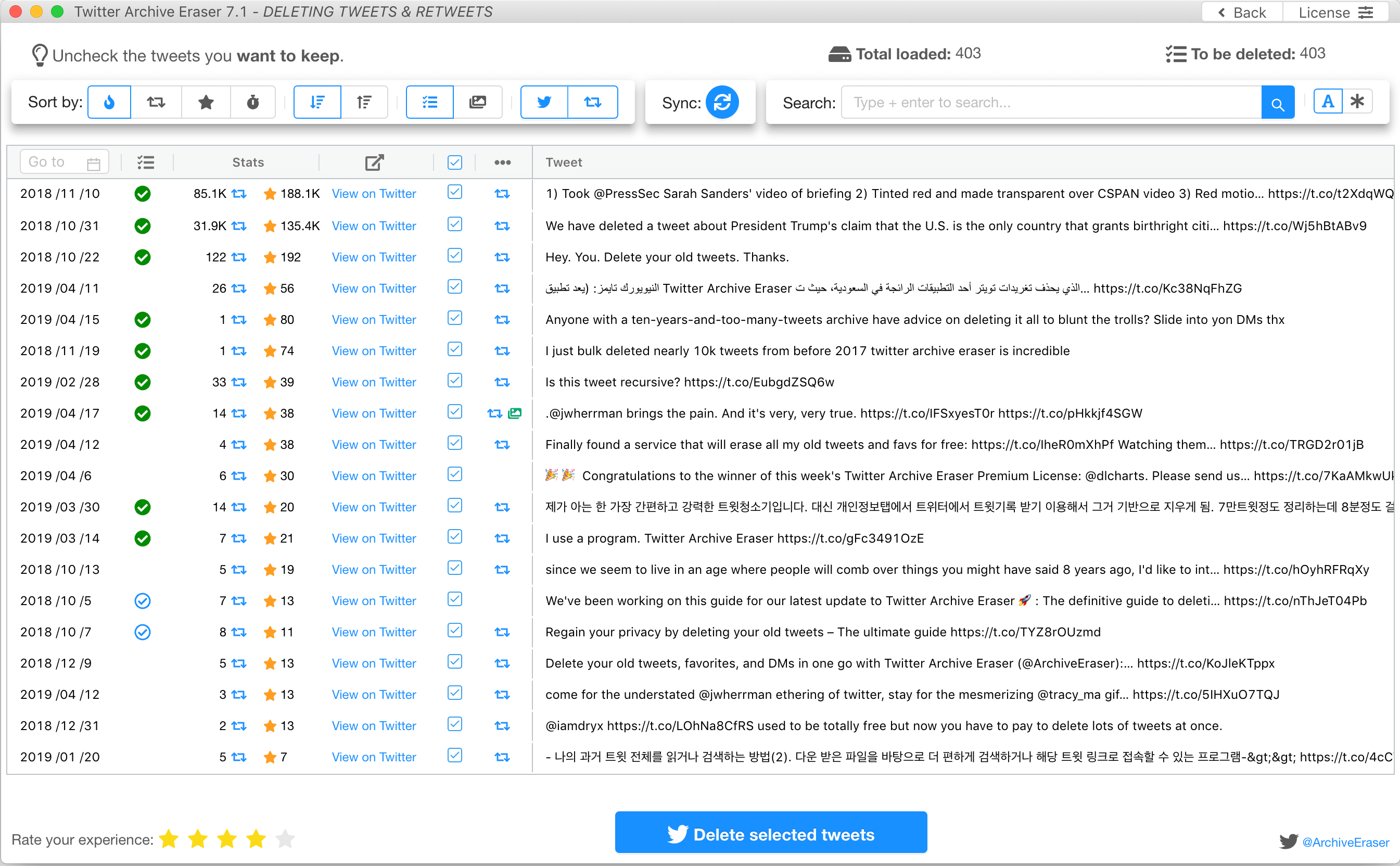
Twitter Archive Eraser delete tweets page
Twitter Archive Eraser main tweet deletion window

7 years later it seems appropriate to move Twitter Archive Eraser to a more descriptive domain name. For this, we have chosen https://delete.tweets.app to indicate that Twitter Archive Eraser is the best tool to delete tweets. This is a descriptive domain name that we hope will be easy to remember for the fans of Twitter Archive Eraser.

The old URL continues to function as usual but will automatically redirect to https://delete.tweets.app.

Happy tweet deletion with Twitter Archive Eraser. Get it at: https://delete.tweets.app 


MSDN Magazine code highlighter

MSDN Magazine has many great articles about all kind of topics you can imagine. The most useful ones talking about the coming versions of C# or .NET for example are a must read.

While the content of the articles is great, the formatting of the code is terrible (non existing actually). The typesetting is inappropriate for code, and the code is simply laid out as simple text, making it extremely hard to read and follow.

People have been asking for formatting on MSDN mag for quite some time without any sign of this happening soon! Here is an example of a page from MSDN Mag:


After trying several chrome extensions that claim to handle syntax highlighting and none of them seemed to work, I have decided to make a small chrome extension that automatically highlights code snippets on MSDN magazine articles.

For this I used https://highlightjs.org/ with jQuery. The extension uses content scripts and have access only to MSDN magazine pages. You can choose among dozens of syntax highlight themes on the fly!

Here is the result without/with the extension installed:


The extension can be downloaded from chrome web store at: [MSDN Magazine code highlighter]

And the source code is obviously available on Github here: https://github.com/martani/MSDN-Magazine-code-highlighter


Twitter Archive Eraser: a year in review

Exactly a year ago today I added some analytics to Twitter Archive Eraser to get some insights on how it is used and what kind of load it is handling.

For those who do not know what Twitter Archive Eraser is, head here to read mode. But in a nutshell: it is the best and easiest way out there to erase your oldest tweets. Period!

So without further ado, here are the numbers for tweets deleted between 1/1/2014 and 1/1/2015:
  • Total tweets deleted: +255,000,000
  • Number of unique users: ~25,000
  • Number of downloads all time (only from official website):
    • Standalone: 52,529
    • Installer: 30,265

  • Top 10 accounts:
    • User
      Total deleted tweets
      @Almoujaz
      498,604
      @CakeLikeBieber
      386,941
      @tommytacklebox
      304,049
      @AdaBerita_
      288,376
      @rimanews
      286,370
      @1nfoku
      285,724
      @BadBoiStewie
      280,776
      @5starbeats4sale
      280,367
      @Shana_Takoyaki         
      279,600
      @nolesfan2011
      257,482
  • Users per number of deleted tweets:
    • Deleted 0 to 10,000: 18,106
    • Deleted 10k to 20k: 767
    • Deleted 20k to 50k: 4865
    • Deleted 50k to 100k: 888
    • Deleted more than 100k: 235
It's amazing to see that more than 23 million tweets belonged to only 235 users!

  • Geographic distribution of users

Some happy users:

VoilĂ , if you feel like deleting some tweets you check Twitter Archive Eraser.


Thoughts on Dashlane Password Sharing [Updated]

Dashlane announced two days ago the availability of version 3 of their product, which is as they describe it "enhanced for teams and families."

I love Dashlane. It is an excellent product when it comes to browser integration and ease of use. Although it has some other restrictions that people might not like (you cannot shut it down, no secure desktop when entering your master password etc.)

When using a password manager, one needs 1) a leap of faith into the product: trust that the product is secure -which is catastrophically not the case even for applications claiming to be number 1 on the marker-, and 2) that the password manager is not actually accessing or going to access its users' passwords and use them or sell them to third parties.

What password managers advance as the reliable foundation that solves both the above points is cryptography! It is very simple (not really): all your passwords are locked with a key, called the master password, on your local machine. Only you know the master password which is supposed to never leave your machine. In case the password manager makes sync/backups to their servers, they only see the encrypted data which is not readable even if somebody got hold of it, not even the password manager itself.

Back to Dashlane. It seems that they are taking the browser integration ease of use and making a "password sharing" as easy as their auto-login feature. You can even set an emergency contact to access your passwords after a given period of time if you don't revoke them.

You can choose to let the person you share your passwords with to have full or read only access to the passwords. A very useless distinction considering if the passwords cannot be changed on your Dashlane app by the other person, they can be changed on the target websites anyways... but that's a debatable use case you might argue!

Now, I can only speculate as to how the sharing of passwords is implemented. That's how +Dashlane describes it on their website:

How does Dashlane enable sharing passwords with others while still not being able to read my data?

When you share a password or other data via Dashlane, only the recipient has the ability to decrypt that data. Dashlane performs the encryption locally on your device, using a 1-way mechanism called public / private key encryption. Once encrypted with the public key of the recipient, the data can only be read with the private key of the recipient which Dashlane does not have. It is like a key that can only be used to lock but cannot be used to unlock."

Good enough indeed. But now, if user A sets user B as their emergency contact, Dashlane stores A's passwords that could be decrypted by B's private key in the case B can get hold of this data, regardless of A revoking or not access to those passwords. Let's hope that Dashlane does not copy A's encrypted data immediately to B's account and holds access control using timestamps for example (I know, very simple and catastrophic to be true, but you never know)

In conclusion, Dashlane cannot claim that your data on their servers is a 100% safe. As far as it is stored somewhere, if a copy of this encrypted (shared) data is accessible, the persons your shared passwords with can still access them, with or without your approval.

Update: one of Dashlane's developers contacted me by email to address the above question, here is his email:
I work at Dashlane and wanted to address your concerns on our new 'emergency contact' feature. I can confirm that we don't send immediately A's encrypted passwords to B. Instead, they are stored on our servers, and can only be accessed once the timer is elapsed, or A authorizes it immediately. Our servers can be hacked (we obviously do our best to prevent it), in which case it could indeed be read by the person you shared it with, so sharing your passwords with people you trust is always a good idea... However, using this feature means you don't also have to trust eg. your email provider (if you are used to share your passwords by email) or any other third party, which is why we think this feature improves the overall security (and convenience) of password sharing.
Hope this answers your questions, don't hesitate if something is unclear or you have other questions.
Glad you love Dashlane!

Twitter Archive Eraser 50 Million Deleted Tweets Cap and Stats

These are the current stats for Twitter Archive Eraser since 1st January 2014:

  • Number of deleted tweets: 50,361,283
  • Number of tweets loaded: 135,405,333
  • Number of unique users: 4011
  • Number of unique sessions (a user can use the application more than once): 8305
  • Total Azure Table Storage entities: 41800


Check for these number in real time at: https://delete.tweets.tools/


Twitter Archive Eraser version 4.0 available

Twitter Archive Eraser version 4.0 was released about a month ago (too lazy to update on the blog here) and comes with an exciting set of new features.


The major features introduced with version 4.0:

  • Zip archive loading: you can now load the whole twitter zip archive in one click without the need to add specific *.js files separately.
  • Automatic errors retry: Twitter Archive Eraser will track any tweets which were not deleted due to network or server side errors and offers to retry deleting them on the fly. You can also save a list of these tweets to delete later.
  • Filtering based on regular expressions: Retweets, mentions etc... You can get all these very easily with Regex based filtering.


Real time statistics and reporting:

One of the exciting features of Twitter Archive Eraser ver 4.0 is statistics. I used Windows Azure Websites and Table storage for this. One of the examples of how valuable are stats is checking the number of tweets deleted using the application in real time. Following is an example of the counter showing these numbers available on the main website of the application):

As for 9th of February 2014, Twitter Archive Eraser deleted ~28 million tweets and loaded ~75 millions, in 6 weeks!!

Licence:

Twitter Archive Eraser version 4.0 comes with an updated licence. In a nutshell:
  • You can always use Twitter Archive Eraser for personal use and distribute it as you wish.
  • You cannot use Twitter Archive Eraser for commercial purposes nor derive works based on it.

If you wish to contribute to Twitter Archive Eraser, you are always welcome to do so on this repository on github at https://github.com/martani/Twitter-Archive-Eraser.

Special thanks for Florent (https://twitter.com/florentsays) for his valuable suggestions.

Download:


Twitter Archive Eraser version 3.0 available

Twitter Archive Eraser 3.0 is now available for download from https://delete.tweets.tools/.

This new version includes a bug fix which caused version 2.1 to crash and two new major features: Parallel deletion, and keyword-based filtering of tweets.

The first feature allows faster deletion of tweets depending on the chosen degree parallelism. It can delete up to 16 tweets concurrently. With version 3.0 it is possible to filter tweets containing keywords; this is very useful to keep/delete any mentions or specific tweets about some subject.


Delete Your Oldest Tweets Using Twitter Archive Eraser [Updated version 2.1]

Looking for the awesome Twitter Archive Eraser? It has a new home now, download it from: 

https://delete.tweets.tools


Old post:

Until very recently, there was no obvious way to access your old tweets. In fact, Twitter imposes a limit of 3200 tweets (the more recent ones that is) that an application can access. This means also that you cannot delete your old tweets. Several tools exist to help you delete your old tweets but, according to my experiments, most of them do not work properly due to Twitter API's limitations.

Last week however, Twitter enabled the option for users to download their whole archive of tweets, which contains among other things the IDs of all the tweets of a user, the exact piece of information that can be used to wipe out any tweet.

I have developed a simple application called "Twitter Archive Eraser" that helps you delete the oldest tweets from your timeline, or wipe out the whole archive too if you would like so.
The application is the simplest possible, it works in 3 steps: authenticate Twitter, select which tweets you want to delete, wipe them out.

Step 1

In this step, you give access to Twitter Archive Eraser to your twitter account so that it can delete the tweets you select. This works by providing a Pin number that twitter provides after authentication.

Step 2

After you download your twitter archive (from https://twitter.com/settings/account) and extract it (to C:\Twitter_archive for example), you choose which tweets from your archive to delete. The tweets in the Twitter archive are grouped by month, ie. all the tweets of a month are stored in the same file.

These files are found in [your Twitter archive path]\data\js\tweets.
For instance, to delete the tweets from September 2009 you choose the file 2009_09.js.

Step 3

Once you have selected the correct files, you are now presented with all the tweets contained in these files. By default, all the tweets are marked for deletion, if you want to keep any specific tweets, you uncheck them as shown in the following picture. One you hit "erase selected tweets" button, there is no going back (unless you force the app to exit!).


You can find the code of the application on github: https://github.com/martani/Twitter-Archive-Eraser. All the Twitter logic is done using the excellent LinqToTwitter library.

Requirements:
.NET Framework 4.0.

Download from: https://delete.tweets.tools


Padding Oracle Attacks In C#

Back when I took the Cryptography class on coursera, one of the programming projects was to develop a padding Oracle attack, I have forgotten about the code, but now it is on github with more tweaks.

The code is modular and in order to be used with a new padding Oracle, one has only to create an object representing this Oracle and wire it to the PaddingOracleAttacker; it's that simple.

The new code is available here: http://martani.github.com/Padding-Oracle-Attack/.

The Oracle must implement the interface ICBCOracle which has one function: bool RequestOracle (byte[] cipher), returning true when the padding is correct, false otherwise. There exists 2 examples of such oracles in PaddingOracleAttackTest/Oracles.
This is an example of an online Oracle which return HTTP code 403 when the padding is bad, and 404 on a correct padding.

Another offline Oracle that uses AES is also provided, it can be used for testing.
Once you have the Oracle ready, all what is left is to attach it to the PaddingOracleAttacker and you are in business:


Do not use this code if you are trying to solve the coursera assignment.


Delve Into Windows Phone 8 (Emulator) Files

As you may know already, the all new Windows Phone 8 emulator runs on Windows Hyper-V, which means that you can start the WP8 OS directly from Hyper-V, and better, you can have total control to explore the files on the system's emulator.

This is pretty useful (I'm sure the folks over xda-developers are already on this) to see around the different parameters in the registry files; to have access to the executable files of the system etc.

For this, all one needs is to attach the virtual hard drive of the emulator. Open the "Administrative Tools" in the (old) control panel then "Computer Management." Choose "Disk Management" and then on the "Action" menu choose "Attach VHD." Now all that is needed is to locate the VHDs of the emulator located in C:\Program Files (x86)\Microsoft SDKs\Windows Phone\v8.0\Emulation\Images.

Following are the registry files from the mounted VHD.


Happy hacking...


Single-Block AES Encryption/Decryption in .NET

While trying to solve the 2nd programming assignment from the excellent crypto class on coursera, it was required to implement the CBC and CTR modes of operation starting from a simple AES block encryption/decryption.

To get this done using .NET's Cryptography.AesManaged or Cryptography.RijndaelManaged, the example on the MSDN documentation was not enough to have a one block encryption. Indeed, the example codes show how to encrypt/decrypt complete clear/cipher texts; this implies applying the chaining in the CBC mode and the underlying padding.

After some tinkering, I used the TransformBlock method of the ICryptoTransform interface. This method does exactly one block transformation of the underlying block cipher (AES in our case), there is no explicit padding involved nor chaining in the case of CBC.

To get a consistent AES block encryption/decryption, it was mandatory to eliminate the XOR with the Initial Vector (IV). This can be achieved whether by using the ECB mode or using the CBC mode with an initial IV = 0^{128}.

The following two methods show the encryption/decryption of a single block using AES. Notice that it is considered cheating if you use the built-in encryption to find the solution to the coursera problem.


Fun(c) with OCaml and Mazes

So today I stumbled upon a post I've wrote almost 3 years ago about solving mazes using OCaml (with graphics yes), and it was actually cool to download the code, type the compiling command and see it run without any issues (C programmers! behold).

So I decided to put the code on github for anyone to test and use (and fall in love with OCaml probably afterwards).

The code is available here https://github.com/martani/ocaml-maze, and it requires no more than a command to compile and run, it solves mazes with square and hexagon shapes.

Posted in |

Twitter on Windows Phone vs Twitter on Android

They say A picture is worth a thousand words, here is a comparison of the twitter app on Windows Phone and on Android. If they were both application on a desktop Windows computer for example!

Twitter on Windows Phone vs Android (Click to enlarge) 

Posted in , , |

Panoramic View of Paris [Xperia Arc S]

I've received the Xperia™ arc S yesterday which I love very much. One of the features I like about this phone is the fact that one can take panoramic photos on the fly, and the great HD video shots along with the great screen.

Here are some shots I took today around Paris, use the mouse to navigate left/right; enjoy.
(You can view the pics in better dimensions here.)


Posted in |

Workaround to Access Windows 8 Start Menu Programs Again

Update:
Much of the search queries to this blog are about this post, or how to access the old start menu on windows 8.

There are great applications that mimic the old start menu. One of the preferred features is that once a user logs in, she is taken directly to the standard desktop. Personally I have been using Stardock's Start 8 (the same guys who developed the awesome Fences application) which I find excellent, it is not free however (costs over $5). Following are screenshots of Start 8 on my Windows 8 laptop.

Start 8

Start 8
Another option is to use the free "Classic Shell" which can be found here http://classicshell.sourceforge.net/. Following is a screenshot of  Classic Shell's start menu:


Old post

If you have already tried the Windows 8 consumer preview, you have surely noticed that there is no start button anymore, which means no easy way to access your programs using the start menu as we used to do since forever.

Start Button missing in Windows 8
This is impractical since it means: whether you have to put some shortcuts on the desktop, or go to the metro start screen each time hoping to find the application icon there.

However, you can do a simple trick to access the whole start menu again.

To do this, right click the Super Bar and choose Toolbars -> New toolbar. In the dialog, choose the folder C:\ProgramData\Microsoft\Windows\Start Menu\Programs and click "Select folder".


Once added, you can click the arrows to access the programs and folders of the start menu, you can also drag it to the left so that it takes the start button's original place.

Start Menu items without a start button on Windows 8
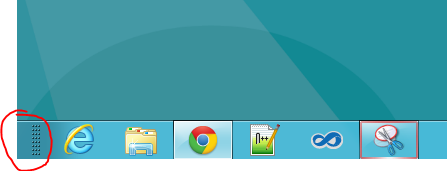
You can also still access some parameters without having to go through the Control Panel shortcuts etc. by hovering over the left bottom corner of the screen and right clicking to get the following menu :


Posted in |

Factoring Large Numbers With Distributed Quadratic Sieve

Integer factorization is a problem that has its roots in the very far history, it is a fascinating problem (to me especially) that has gained a lot of attention in the recent years for cracking the RSA cryptosystem for example.

While having no time to blog about the internals of one of the very efficient methods to factorize relatively large numbers, I present here a simple implementation I have developed of the Quadratic Sieve to factorize relatively big RSA numbers. For a reference about the mathematical premises, the 6th chapter entitled Subexponential Factoring Algorithms of the Prime Numbers, A Computational Perspective book is pretty great.

The program available here is composed of 4 different versions, 3 centralized (sequential) and 1 distributed using MPI. The distributed version needs to be run on at least 2 nodes. The centralized versions consist of different implementation experiments : 
  • The first one keeps the exponent vector of each smooth number (impractical due to the huge memory needed to keep the vectors).
  • The second one sieves at an interval centralized at sqrt(N); according to my testing, this has no visible improvements over the standard one. 
  • The last version which is the same as the first one but which uses only a binary exponent vector (saving one bit for each prime in the base) for the smooth numbers.

One of the caveats of this implementation is the linear algebra step that performs the Gaussian elimination. The method I am using is the most naive one (though goes pretty fast using XOR operations on GMP integers) which keeps an identity matrix besides the effective matrix while performing the Gaussian elimination, and hence the program needs twice the memory needed for the matrix.

The distributed version spawns as many nodes as needed and makes them all perform the sieving step, after some very hundreds of thousands of steps, the slaves communicate their found smooth numbers to the master which decides if they must stop or should continue sieving for more numbers. Sending GMP integers mpz_t over MPI was very challenging due to the way MPI handles the string representation of these numbers (sometimes '\0' are included at the end and the length returned does not represent exactly the number of characters in the string).  You can take a look at the functions doing the MPI send/receive of mpz_t here.

You will need the mpfr library too (for logarithm calculations) in case you want to test the programs, for the distributed version, compile with mpicc and run with mpirun as usual.

Results:
Centralized version:
Distributed version (60 intel i7 nodes):

Posted in , , |

Factoring Integers: Part 1 - Pollard's rho Method

I'll be developing a program for factoring numbers (especially RSA numbers), the goal is to have a parallel quadratic sieve program running on GPUs (using CUDA or OpenCL) to factorize RSA numbers.

I have just started playing around GMP so I implemented a naive version (in C) of the Pollard's rho factoring method, it uses the optimisation technique proposed by Pollard and Brent, however it doesn't check for cases that may cause the algorithm to fail.

In order to compile this program, you need to have GMP installed.
You can invoke the program with ./pollard-rho NUMBER or ./pollard-rho p q where the number to factorize is p*q.

Compile : gcc pollard-rho.c -o pollard-rho -lgmp -lm


Rolling Back a Project to Windows Phone OS 7.0 After an Upgrade to 7.1 (Mango)

If you had a project that was developed before the Mango SDK was available, or a project that was created with the Windows Phone 7.0 as the target platform and wanted to upgrade to 7.1, then there is no way to roll back to 7.0 again, which means that your app will be available only for those who have Mango updated devices.

On creating a new Windows Phone project with the Mango 7.1 SDK tools installed, Visual Studio prompts you for the target platform:
If for any reason, you want to upgrade the app to take advantage of the 7.1 SDK (use background agents, live tiles' animations etc..), you go to Project -> Project properties and set the target to OS7.1:
Once the Windows Phone OS7.1 version is selected, Visual Studio shows the following warning stating that once upgraded, the application cannot roll back to Windows Phone OS 7.0 anymore :

Because the referenced projects are not upgraded with the app, there is actually a way to roll back anyways, even if Visual Studio warns it is not possible.

First in the WPAppManifest.xml you need to change the AppPlatformVersion back to "7.0". Then unload the project from Visual Studio and open your *.csproj with a text editor. Locate <TargetFrameworkProfile>WindowsPhone71</TargetFrameworkProfile> and change it to <TargetFrameworkProfile>WindowsPhone</TargetFrameworkProfile>.

Reload the project in Visual Studio, and voila, it's back to version 7.0.

Hope this helps.


Posted in , |

Bloginto 2.1 Now Available

Bloginto 2.1 is available for download from the Google Chrome Web Store, the 2.1 version is a patch to the 2.0 version after the (abrupt) changes of Bloginy Algeria.

Bloginto is a Chrome extension that brings Bloginy Algeria and Morocco feeds to the browser. With Bloginto you can:

  • Read the live feeds of Bloginy Algeria and Morocco
  • Keep track of the new feeds and get notified whenever newer news are available
  • Keep track of the read and unread feed entries
  • Vote for the feed entries directly from the browser with 1 mouse click
  • Tweet directly through the extension

Bloginto is an open source extension, you can grab the source code from here https://github.com/martani/BlogInto-Chrome, you can suggest amelioration and patches too.


Swedish Greys - a WordPress theme from Nordic Themepark. Converted by LiteThemes.com.